Skip to Main Content
Our Support Hub
Our Support Hub Our Support Hub Knowledgebase Sell For Me Funnel®️ (SFMF & SFMF-PRO) Sell For Me Funnel Pro (SFMF PRO)
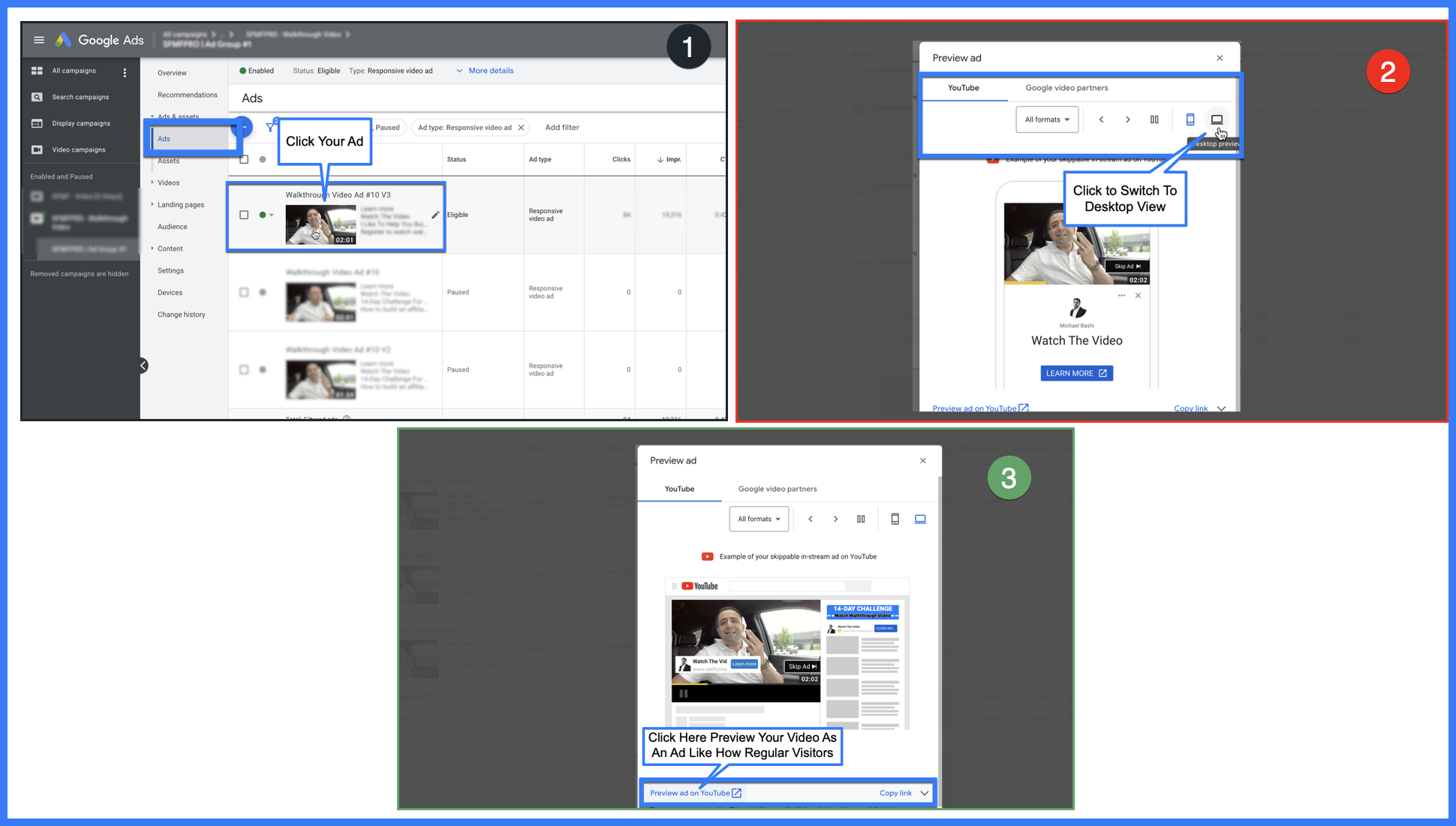
SFMF PRO | How can I view my YouTube Video as an AD; Like how regular viewers will see it?
Suggested knowledgebase articles:

SFMF PRO | How can I view my YouTube Video as an AD; Like how regular viewers will see it?

Follow the diagram below to know how to view your YouTube video as an AD like how others will see it. You cannot search for it on YouTube, but you can view it as an AD from within your Google Ads account.
Was this article helpful? Yes | No

Article Details

Article ID:
243
Category:
Sell For Me Funnel Pro (SFMF PRO)
Date added:
2022-11-29 04:47:32
Views:
735
Rating (Votes):
(5)
Go back

Related articles

  • SFMF PRO | How To Add My Custom Segments In My Google/YouTube Ad Campaign
  • SFMF & SFMF PRO | What is the difference between SFMF Vs. SFMFPRO? | Video Explainer
  • SFMF PRO | How A Google Ads Campaign Using (Audiences/Keywords) Result In An Affiliate Commission For You?
  • SFMF PRO | Number of leads I generated into my autoresponder (aWeber) account is not the same as what I see inside my Google Ads campaign conversions column. WHY?
  • SFMF PRO | I have gone through and created my Google campaign but I don't see the: Excluded Types And labels like you show in the training video?
  • Helpful Article | What is Google Webmaster Tools ?
  • SFMF PRO | If I update/edit my YouTube Ad on Google Ads; do I lose all my current data and stats?
  • SFMF PRO | Can l change the YouTube AD after it has gone live and started?
  • SFMF PRO | Can I hire someone to record my YouTube video ad?
  • SFMF & SFMF PRO | How To Use Tagging/Parameters To Track Lead Conversions?